How Adblockers Impact Your Website Analytics
Brave drops analytics requests outright by default. Safari's ITP takes a different path, letting the request through but capping the GA4 cookie at seven days. Firefox blocks third-party cookies for everyone but only kills GA itself under its opt-in Strict setting. None of this is an edge case.
This page covers what each browser actually does and what the resulting gap costs you in business terms. For the full sourced numbers, see the adblock statistics post.
Default behaviour toward Google Analytics
Blocks google-analytics.com and googletagmanager.com out of the box, via EasyPrivacy.
Filter lists drop the request before it leaves the browser. Requires the user to install the extension.
Blocks tracking content in all windows using the Disconnect list, which covers Google Analytics.
Allows Google Analytics in regular windows; blocks it only in Private windows. Third-party tracking cookies are blocked regardless.
Does not block the request. Caps the script-set _ga cookie at 7 days — 24 hours from ad click-throughs — so returning visitors are counted as new.
The default level permits analytics from sites the user engages with. Strict blocks more, but is opt-in.
Blocked requests vanish from reports entirely; capped cookies distort attribution instead
Sources: Brave — Shields · Mozilla — Enhanced Tracking Protection in Firefox · WebKit — Intelligent Tracking Prevention · Disconnect — Tracker Protection Lists
The Scale of Adblock Adoption
The trendline has only gone one direction for years, and nothing suggests it's about to reverse.
Global adblock usage
Backlinko put worldwide ad blocker usage at 29.5% of internet users in Q2 2025 — roughly 1.77 billion people.
Tech audience rate
Among developer, IT, and tech-savvy audiences, adblock adoption regularly exceeds 50%, making analytics even less reliable.
Users with adblockers
Over 912 million devices worldwide run adblocking software, and this number grows every year.
Year-over-year trend
Browser-native blocking (Brave, Firefox ETP, Safari ITP) means adblocking grows even without extensions being installed.
How Much Data Are You Losing?
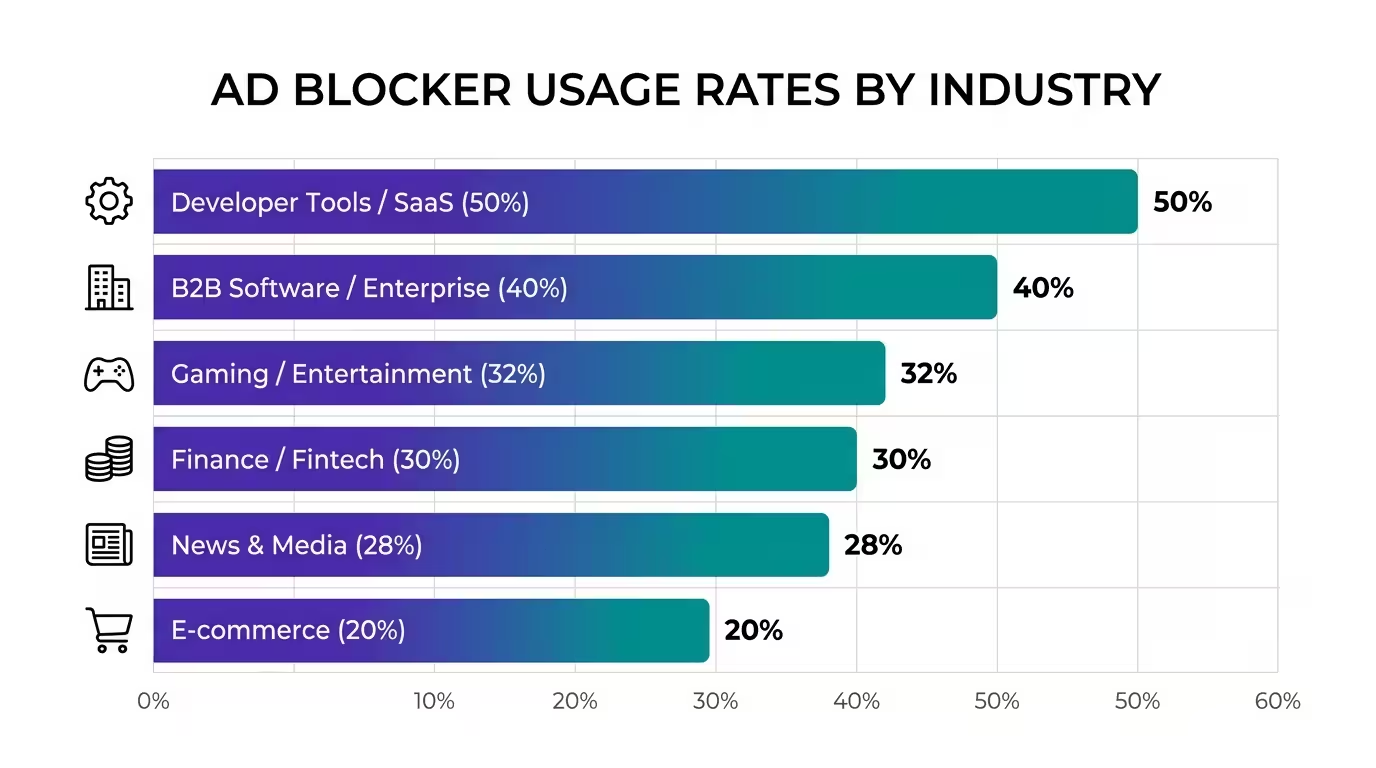
Blocking rates swing hard by industry — as a rule, the more technical the audience, the bigger the gap in your data.
| Industry / Audience | Est. Blocked Traffic |
|---|---|
| Developer tools / SaaS | 40–60% |
| B2B software / Enterprise | 30–50% |
| Finance / Fintech | 25–35% |
| News & media | 20–35% |
| Gaming / Entertainment | 25–40% |
| E-commerce (general consumer) | 15–25% |
These are directional estimates extrapolated from browser market share and published adblock adoption surveys — not measured per-industry figures. Treat them as a prior to check your own data against. Measure your site's data gap →
Two Types of Blocking: Extensions vs. Browser-Native
"Adblock" usually conjures a browser extension. A large share of your audience never installed one, and blocks analytics anyway.
Extension-Based Blocking
uBlock Origin, AdBlock Plus, and Privacy Badger all work the same basic way: load a filter list (EasyPrivacy, uBlock's own lists), match outbound requests against it, drop anything that matches before it's sent. The user installs the extension; everything after that is automatic.
Browser-Native Blocking (No Extension Required)
More and more browsers just ship tracking protection built in. Nobody in this group installed a thing, which is exactly why it's the fastest-growing slice of your blocked audience.
Brave
Ships with a compiled adblock. Blocks all standard analytics endpoints by default. ~3% browser market share, rising.
Firefox ETP
On by default since 2019, using the Disconnect list. The default Standard level blocks third-party tracking cookies but still allows Google Analytics outside Private windows; the opt-in Strict level blocks it everywhere. ~4% market share.
Safari ITP
Intelligent Tracking Prevention: caps third-party cookies, restricts referrer headers, limits JS-set first-party cookies to 7 days.
Edge Balanced/Strict
Blocks known trackers from Microsoft's list. Opt-in strict mode blocks analytics completely.
The Combined Impact
Extension users and browser-native blocking overlap, so you can't just add the two percentages — but they do compound, and the real affected audience is wider than any single global figure suggests. Worth keeping the failure modes separate when you audit your own numbers, too: Brave and uBlock users go missing entirely, while Safari and Firefox users mostly still show up, just with degraded attribution. Standard analytics tooling can't recover either case on its own, since the blocked requests never make it to the server in the first place.
How Missing Data Affects Your Business
This isn't just a smaller number in a dashboard. Missing analytics data cascades into decisions made on the wrong basis, and eventually, lost revenue.
Marketing ROI Miscalculation
Untracked conversions make cost-per-acquisition look worse than it is, which is a good way to cut a campaign that's actually working or starve a channel that's actually paying off.
Wrong A/B Test Conclusions
Adblock users often behave differently from everyone else, which skews your test results. You could easily be shipping the variant that would've lost with your full audience.
Inflated CPA in Ad Platforms
Google Ads, Facebook Ads, and similar platforms bid based on the conversions they're told about. Tell them less than the truth and the bidding gets it wrong, which shows up as higher real acquisition cost.
Underinvestment in High-Value Channels
Adblock users skew toward being high-value customers. Lose visibility into their journey and it's easy to underinvest in exactly the channels and content bringing in your best ones.
How to Fix the Data Gap
The fix that actually holds up: route blocked requests through a domain that isn't on any filter list, a first-party proxy on your own subdomain. It covers every analytics tool at once, needs no server infrastructure, and only ever touches the signals that were actually blocked.
The recovery guide has the full technical breakdown: how filter lists work, why a proxy gets past them, and how the different recovery approaches compare.
See How Recovery WorksFrequently Asked Questions
What percentage of users have adblockers installed?
About 1.77 billion people, or 29.5% of internet users globally as of Q2 2025 (32.5% in the US), per Backlinko — with desktop usage well ahead of mobile. Where your own site lands depends heavily on audience: developer, B2B, and privacy-conscious traffic sits above that average, mainstream consumer traffic below it. uBlock Origin and AdBlock Plus lead the extension side; Brave and Samsung Internet handle a growing share natively.
Which analytics tools are affected by adblockers?
Basically every client-side tool: GA4, Google Tag Manager, Facebook Pixel, TikTok Pixel, LinkedIn Insight Tag, Mixpanel, Amplitude, Segment, Hotjar, FullStory, Heap. Adblockers maintain filter lists updated on a rolling basis specifically to target tracking domains and scripts.
How does analytics data loss affect business decisions?
Traffic gets under-reported, conversion attribution goes off, cost-per-acquisition looks inflated, A/B tests reach the wrong conclusion, and marketing budget follows all of that bad data. The dangerous part is teams rarely realize it's happening — the effect just compounds quietly over time.
Can Google Analytics bypass adblockers on its own?
No. Standard GA4 (gtag.js) sends data to google-analytics.com/collect, and that endpoint is on every major adblock and privacy filter list. Google has no native first-party proxy option to route around it.
Does Safari ITP block Google Analytics?
Not the way uBlock does — ITP doesn't use filter lists at all. It restricts cross-site tracking and caps JavaScript-set first-party cookies at 7 days instead. GA4 pageviews mostly still get through; what breaks is long-term attribution and stitching a user across sessions.
Which industries lose the most analytics data to ad blockers?
Developer tools and SaaS take the biggest hit, 40–60% of traffic blocked, thanks to heavy uBlock and Brave adoption among engineers. B2B and enterprise software follows at 30–50%, driven by IT-managed devices and corporate filtering. Mainstream consumer e-commerce comes in lowest at 15–25% — that audience just installs fewer extensions.
Solutions
Further reading
Start Recovering Your Missing Analytics Data
Adblockers are hiding your real website performance from you. Get the blocked analytics signals back with one line of code. Start free.