Your tags either load. Or they quietly don't.
For a measurable share of visitors, your tag stack simply never runs: scripts don't arrive, events don't land, nothing throws an error. Introtrace gets what's blocked through anyway, from a domain filter lists don't reach. One script tag.
The problem
When the tag layer is blocked, everything you put in it goes dark
Filter lists don't target your analytics specifically — they target the domains almost every marketing tool loads from. One rule, and every tag that depends on that domain stops firing for that visitor.
No error. No failed build. No alert of any kind. The visitor shows up, browses, maybe converts, and your reports simply never register it happened — leaving you to allocate budget against a dataset with a hole whose edges you can't see.
Of US internet users
block, above the global average. Desktop runs far higher than mobile.
Backlinko, Q2 2025 ↗Of your visitors, if you sell to developers or B2B
Fashion and mobile-first ecommerce typically 8–15%. Directional — measure your own.
Blockthrough / PageFair ↗Of digital marketing budget
misallocated on average, where GA4 alone drives attribution.
Paramark ↗It's rarely just analytics
Most teams route far more than measurement through GTM. Block the container, and everything riding on it goes dark at the same moment:
The analytics gap is usually what teams notice first, since that's the report somebody actually opens on Monday. Everything else fails right alongside it, just as quietly.
High-value users are disproportionately invisible
Adblocker users skew younger (18–34), more technically sophisticated, and higher income. Blocking runs well above the 29.5% global average in developer and IT audiences (Backlinko, Q2 2025). The segment you most want to understand is the one your analytics misses most.
Attribution is where it really breaks
The gap isn't random, so it doesn't average out — it concentrates in whichever channels bring you the most technical audience. Those channels report worse than they perform, and the budget moves away from them. You may be cutting what's working.
The mechanism
Serve what's blocked from a domain no filter list touches
Everything your page loads from a third-party domain can be dropped by a filter list. Introtrace's proxy isn't on one — and on a paid plan you can point a CNAME at it so the requests come from your own subdomain, which no filter list can touch without breaking your site.
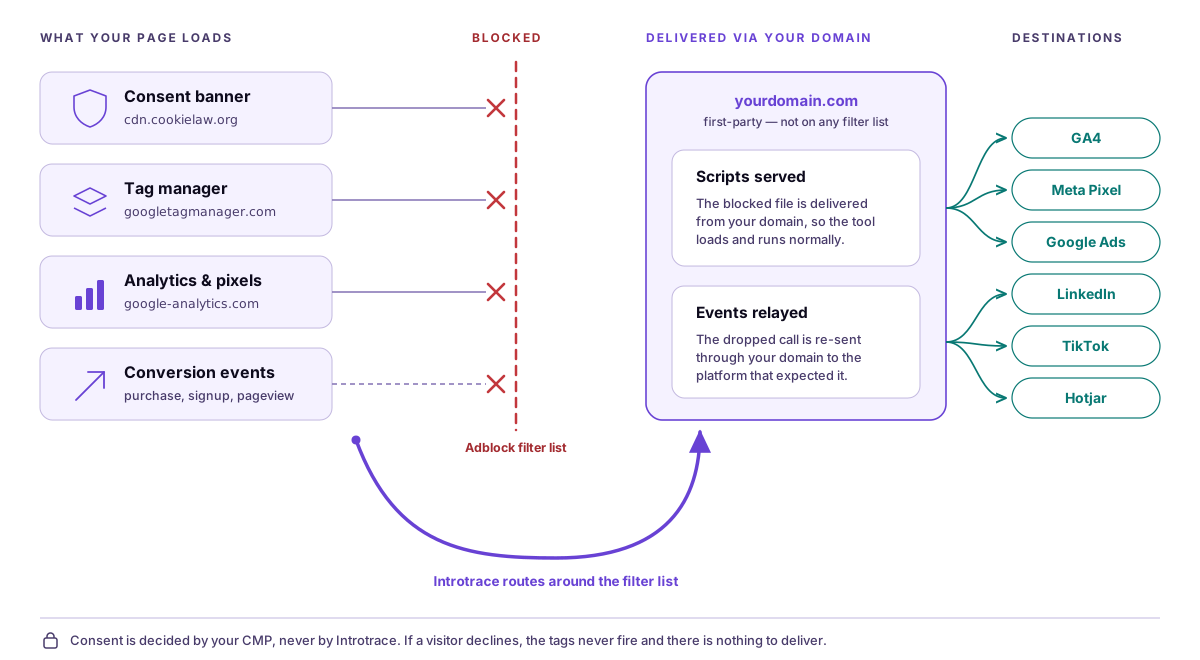
The blocked route: your page requests a consent banner, a tag manager, and analytics and pixel scripts from third-party domains, and it sends outbound conversion events to advertising platforms. An adblocker's filter list stops all four. Nothing reaches its destination, and no error is raised.
The route that works: Introtrace routes the same traffic around the filter list through a domain no filter list blocks — cdn.introtrace.com by default, or, as drawn here, a subdomain you own once a CNAME is configured on a paid plan. Blocked scripts are served from that domain so the tool loads and runs normally, and dropped events are relayed onward to the platform that expected them — GA4, Meta Pixel, Google Ads, LinkedIn, TikTok, and Hotjar.
Consent is decided by your CMP, never by Introtrace. If a visitor declines, the tags never fire and there is nothing to deliver.
Two things get blocked, and they fail differently
The script never arrives
A filter list blocks the domain a tool loads from — googletagmanager.com, cdn.cookielaw.org, static.hotjar.com. The browser requests it, the request is dropped, and the tool simply isn't there. No container initialises, no banner renders, no widget appears. Introtrace serves these from cdn.introtrace.com (or your own subdomain, on a paid plan) so the script arrives and runs normally — including gtm.js, which brings your whole container back with it.
The event never lands
The script loaded fine, but the outbound call to GA4, Meta, or Google Ads is blocked on its way out. The visitor's action happened; the record of it didn't. Introtrace detects the dropped call and relays it through your domain to the platform.
Clean data
Suppress bot traffic from your analytics
GA4 filters bots on the IAB list by default, and Cloudflare catches obvious crawlers at the edge. What gets through is the harder category: AI-driven scrapers, headless browsers mimicking real users, and custom tools built specifically to evade standard filters.
These inflate session counts, distort engagement metrics, and quietly skew A/B test results — without triggering any existing alarm.
of all global web traffic was non-human in 2024 — bots exceeding humans for the first time in a decade
Imperva Bad Bot Report, 2025 ↗of internet traffic came from bad bots in 2024, up from 32% in 2023 — sixth consecutive year of growth
Imperva / Thales, 2025 ↗of retail web traffic was non-human in 2024 — the highest share of any vertical, driven by price-scraping and inventory bots
Imperva Bad Bot Report, 2025 ↗faster — the rate at which AI-driven internet traffic grew versus human traffic in 2025
Human Security, 2026 ↗Bots get filtered before they count
Crawlers, headless browsers, synthetic visitors — when Introtrace flags one, the analytics signal stops there. It never reaches GA4, Facebook Pixel, or anywhere else, so your reporting layer only ever sees traffic that was already clean.
True visitor behaviour, finally
Know how often real users actually visit, which pages they return to, and where they genuinely drop off — without bots inflating return-visit rates, time-on-page, and engagement metrics. Every benchmark you rely on becomes more accurate.
Alternatives
Introtrace vs server-side GTM, Meta CAPI, and Enhanced Conversions
Server-side GTM, Meta Conversions API, and Google Enhanced Conversions each solve part of this problem too. Here's how they compare.
Server-side GTM
Strengths
Full control over data routing. Works well for complex tag setups and data enrichment.
Trade-offs
Requires provisioning and maintaining cloud infrastructure. Typically $50–300+/month in cloud costs, plus engineering time to set up and keep updated.
Right for teams with a dedicated data engineer and existing GTM expertise.
Meta CAPI / Google Enhanced Conversions
Strengths
Platform-native. Improves attribution directly in Meta Ads and Google Ads dashboards.
Trade-offs
Platform-specific — CAPI only helps Meta, Enhanced Conversions only helps Google. Requires backend integration for each platform separately.
Right if you run heavy spend on one or two platforms and have backend access.
Introtrace
Strengths
A single script tag covers GA4, GTM, Meta Pixel, TikTok, LinkedIn, and anything else running client-side. It also serves blocked scripts, CMP loaders included, from a domain filter lists don't reach — your own subdomain on a paid plan — something neither alternative touches. Nothing to manage on the infrastructure side.
Trade-offs
Only recovers signals that are actively blocked client-side. If you've already fully implemented server-side tracking, the marginal lift is smaller.
Right for mid-market teams running paid media without a dedicated data engineering function.
Run them together
If you're already running sGTM, Introtrace makes sure the client-side loader that triggers your sGTM container actually reaches it, even when an adblocker blocks that loader script. Read the full comparison →
There's one gap neither alternative closes. Server-side GTM and CAPI both move processing off the browser, but they can only work with what the browser managed to load in the first place. When a tool's script is blocked on the way in — your CMP loader, a tag library, a widget — there is nothing for a server container to receive. Serving that script from a domain filter lists don't target is the only fix, and it happens client-side by definition.
The outcome
Analytics you can act on
Recover the signals and strip out the bots, and marketers finally see true campaign performance. Ecommerce teams see real conversion behaviour. SEO and digital leads end up optimising for people who are actually there.
Frequently Asked Questions
Does Introtrace interfere with cookie consent banners?
No — it doesn't touch the consent layer at all. Your CMP (Cookiebot, OneTrust, Axeptio, whatever you run) asks the question and records the answer exactly like it always has. The only time Introtrace gets involved is if the CMP's own script gets blocked, in which case it can serve that script from a domain filter lists don't reach, the same way it handles GA4 or GTM.
Can Introtrace help if my cookie banner itself is blocked?
Yes. CMP loaders sit on third-party domains that get filter-listed too, so a blocked loader just means the banner never renders — nothing shows, nothing errors. Introtrace serves it instead from a domain those lists don't cover, the same treatment any other blocked tool gets. One requirement: it has to load independently of the thing it's protecting, which the next question covers.
Should I load Introtrace through GTM?
Load it directly in the page <head>, ahead of GTM and your CMP snippet. Deploy it as a tag inside GTM instead and it inherits GTM's fate: block the container and Introtrace never loads either, so it has nothing left to protect. Going first is what keeps it standing in exactly the situation it exists for.
How does Introtrace detect that an analytics signal was blocked?
It watches outbound requests to known analytics endpoints — GA4, Facebook Pixel, GTM, and similar. When one of those fails to complete because an adblocker intercepted it, Introtrace catches the failure and relays it through the proxy, or, on a paid plan with a CNAME configured, through your own subdomain.
Does the proxy run on my domain or yours?
Depends on the plan. Nothing to configure out of the box: requests go to cdn.introtrace.com, a domain that isn't on adblock filter lists the way googletagmanager.com or connect.facebook.net are, so recovery works the moment the script loads. A paid plan adds a CNAME and moves the proxy onto a subdomain you actually own, like analytics.yoursite.com — genuinely first-party, and the stronger option, since a subdomain of your own site can't be filter-listed without breaking your site along with it. It just needs a DNS record, which is why it isn't the default.
Do I need to change my Google Analytics or GTM setup?
Nothing about your GA4, GTM, or pixel configuration changes — no re-tagging, no container edits. The one thing that does need to move is the Introtrace tag itself: place it in the page <head>, ahead of GTM and your CMP snippet, so it's still standing when those get blocked.
How does Introtrace compare to server-side GTM and Meta CAPI?
Both solve a piece of this, at a cost. Server-side GTM means cloud infrastructure and ongoing engineering time. CAPI only helps Meta, and it needs its own backend integration. Introtrace covers every platform at once with a single script tag and nothing to host. Already running server-side GTM? Introtrace still helps there — it makes sure the client-side loader that triggers your sGTM container actually gets through when an adblocker targets it.
How does Introtrace handle bot traffic?
User-agent analysis, behavioral fingerprinting, known crawler signatures — once something's flagged as a bot, its analytics signal gets suppressed before it goes anywhere. GA4, Facebook Pixel, whatever platform you send to, the request just doesn't reach it. No extra configuration needed to keep the data clean.