How to Fix Analytics Blocked by Ad Blockers
EasyPrivacy, uBlock Origin, and the rest catch requests to google-analytics.com, googletagmanager.com, and connect.facebook.net the instant they leave the browser. No error, nothing you'd notice.
This page covers what actually gets blocked, why, and how a first-party proxy gets the signal through without touching the rest of your traffic.
How Introtrace Works
29.5%
visitors blocked
1 line
of code to fix it
100%
signals recovered
The mechanics
What Exactly Gets Blocked — and What Doesn't
Adblockers work at the network request level, not the JavaScript level — your analytics code runs exactly as written, and JavaScript never gets disabled. It's the outbound HTTP call that gets intercepted and dropped before it leaves the browser.
Blocked (third-party domains)
Not blocked (first-party)
That's the whole trick behind the proxy approach: resend the blocked signal to a host no filter list has a rule for. Add a CNAME to your own subdomain on a paid plan and it goes one step further — the request looks like any other first-party API call your site makes, because at that point, it is one.
The fix
How Introtrace Recovers Your Blocked Data
Introtrace isn't server-side tracking and it isn't a full proxy — it only touches the signals adblockers actually block, and leaves everything else alone.
Add One Script Tag
One line of code on your site. Nothing server-side, nothing to configure — it sits alongside GA4, GTM, and whatever marketing pixels you're already running.
Blocked Signals Detected
The instant an adblock or privacy extension kills an analytics signal, the script notices. Signals that were never blocked don't get touched at all.
Data Recovered to Your Tools
Blocked signals go back out through cdn.introtrace.com, or your own subdomain on a paid plan with a CNAME, and land where they were headed. GA4, GTM, Facebook Pixel, whatever's downstream gets the full picture.
Coverage
Works With Every Analytics Platform
Every major analytics and marketing platform is covered, and none of them need separate configuration.
The cause
Why Adblockers Block Your Analytics
It isn't a guess on their part — they're matching against maintained blocklists built specifically to target analytics and tracking domains. Once you see how that matching works, recovering the data is a lot more straightforward.
The Filter Lists
EasyPrivacy, uBlock Origin's own filters, Disconnect.me's tracking list — these community-maintained lists carry tens of thousands of patterns aimed at known analytics domains, and get updated daily as new tracking endpoints show up.
google-analytics.com/collectgoogletagmanager.com/gtm.jsconnect.facebook.net/fbevents.jsstatic.hotjar.com/c/hotjar.jscdn.amplitude.com/libs/analytics.jsBrowser-Native Blocking
Extensions are only half the picture. Brave, Firefox ETP, Safari ITP, and Edge ship tracking protection turned on by default, no install required — which means a real chunk of your audience is blocking analytics at the browser level without lifting a finger.
See the full browser-by-browser breakdownVolunteer communities maintain these lists at real scale — EasyList's EasyPrivacy has been running since 2009 and gets updated daily. Grow big enough as an analytics vendor to be worth tracking, and you'll eventually land on one of these lists; that's not a flaw in any particular tool, it's just how the web's privacy ecosystem works now. The only fix that actually holds up is moving analytics traffic off third-party domains entirely.
Why a First-Party Proxy Recovers the Data
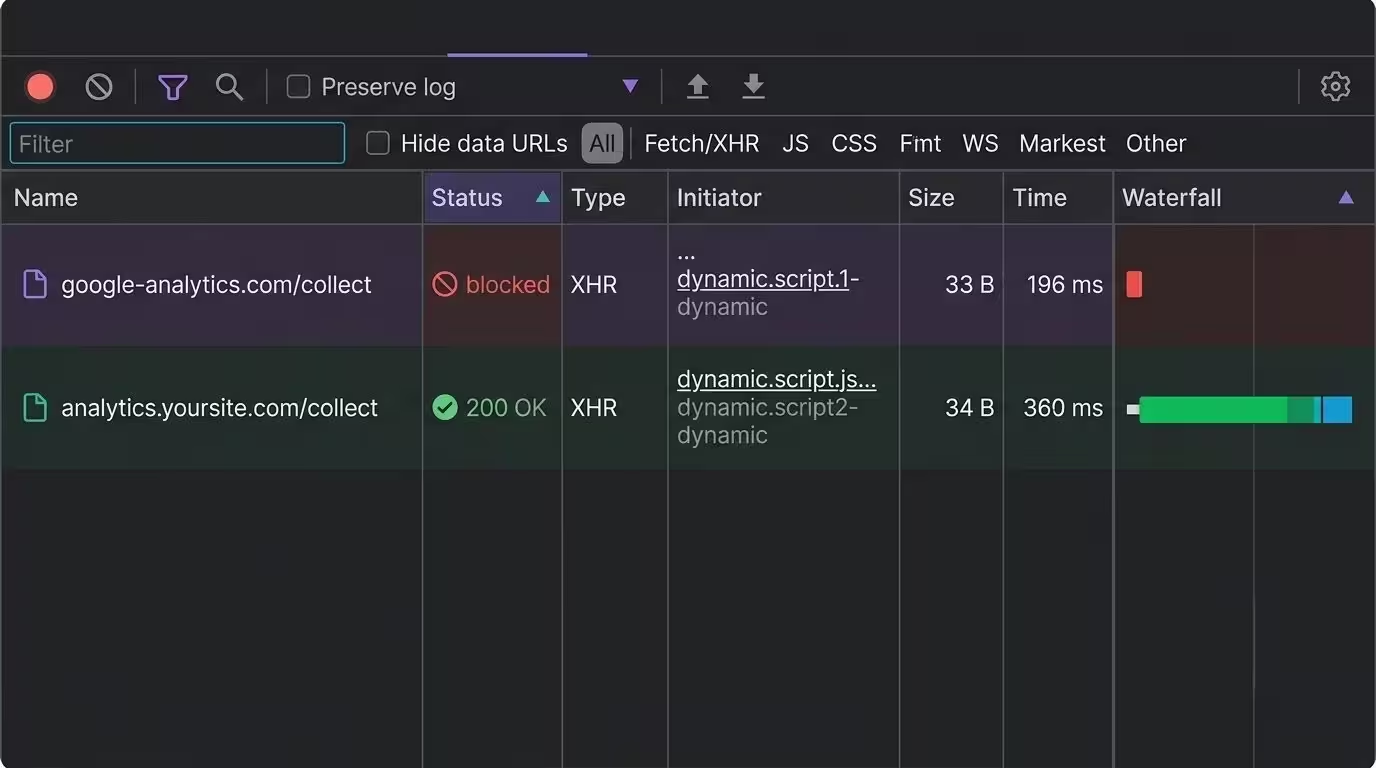
Filter lists match on domains and URL patterns, nothing else. Reroute a blocked signal through a subdomain of your own site — analytics.yoursite.com, say — and it matches no pattern on any list, because it now looks exactly like any other first-party call your site makes.
Blocked request
google-analytics.com/collectRecovered via Introtrace
analytics.yoursite.com/collectForwarded to Google
google-analytics.com/collect ✓Why Introtrace
Why Teams Choose Introtrace to Recover Adblock Data
2-Minute Setup
One script tag, and that's it — no server changes, no DNS work on the free plan, no sprint to schedule.
GDPR & CCPA Compliant
Zero logging. Nothing gets stored on our end; data flows straight from your visitors to your analytics provider.
Recovers Only Blocked Signals
A full proxy routes everything through itself. Introtrace steps in only when a signal's actually blocked — lower cost, lower latency, and cleaner data as a result.
Accurate Geographic Attribution
A recovered signal keeps the visitor's original location context intact, so geographic reports, audience segments, and anti-fraud checks don't degrade.
Start Free, Scale as You Grow
20,000 recovered signals a month, free. Paid plans start at $9.99/month and add custom domain support for stronger recovery still.
A full reverse-proxy setup routes all of your traffic through an intermediary, latency and infrastructure cost included. Introtrace doesn't do that — it watches for blocked requests and acts only on those. Say 30% of your users block analytics; the other 70% of traffic is completely unaffected, going straight from browser to provider like it always has. No new single point of failure, no added latency for most of your users.
Frequently Asked Questions
What's the fastest way to check if I'm losing analytics data right now?
Load your site in Brave with the Network tab open, then load the same page in regular Chrome and compare. In Brave, the requests to google-analytics.com and googletagmanager.com just don't show up — no error, no warning, nothing. That silence is exactly the gap Introtrace recovers.
Which signals does Introtrace touch, and which does it leave alone?
Only failed sends. The script wraps the outbound calls your analytics tags make and watches specifically for network-layer failures — a blocked-by-client style failure, not a slow response or a 4xx from the provider itself. Only that failed signal gets replayed, through cdn.introtrace.com by default or your own subdomain once a paid plan's CNAME is set up. A slow-but-successful request, or one your provider rejected on its own merits, is left alone — Introtrace recovers what an adblocker killed, not your own bugs.
Is recovering ad-blocked analytics data legal and GDPR compliant?
Yes. It's a pass-through proxy, no user data stored, fully GDPR and CCPA compliant, with everything forwarded straight to your existing analytics provider.
Do I need to re-tag or reconfigure my analytics to recover the data?
No — your GA4, GTM, and pixel setup stays exactly as it is. Introtrace recovers signals your tags already tried to send, so there's no container to rebuild. The one thing that matters is placement: put the Introtrace tag in your page head, ahead of GTM and your consent banner, so it's already running when those get blocked.
How long does it take to set up Introtrace?
Under two minutes. One script tag in your site's head section, no server-side changes, and you're recovering blocked data right away.
Does recovering adblocked analytics violate user privacy?
No — it's the identical data an analytics tool would already collect from a visitor without an adblocker. You're recovering a signal the user's browser was going to send anyway; the adblocker just stopped the request in transit. Introtrace doesn't collect anything extra, doesn't fingerprint, and doesn't hold data past the request's own lifetime.
How do I know how much data I'm currently losing to adblockers?
Compare your analytics session count against server logs or CDN requests for the same window. Server-side requests don't care about adblockers, so the gap between that number and your GA4 sessions is roughly your loss. Once Introtrace is installed, recovered volume shows up directly in the dashboard.
Can adblockers detect and block Introtrace?
By default, signals go out through cdn.introtrace.com — a domain filter lists don't target the way they target googletagmanager.com or connect.facebook.net, both shared endpoints used by millions of sites, which is precisely what earns a domain a filter rule in the first place. A paid plan can go further with a CNAME to your own subdomain (analytics.yoursite.com), which is the more durable route: a subdomain of your own site can't land on a public blocklist without breaking that site too, so maintainers leave it alone.
Learn More
Stop Losing Analytics Data to Adblockers
Plenty of sites are already recovering their blocked analytics data. Start free, 20,000 recovered signals a month included.